Monday, 12 May 2014

Real case study: The impact of I.C.T. on Libraries


Application of I.C.T. in Libraries

Computers are used in libraries all over the world to provide access to a range of electronic information resources and to manage materials (books, journals, videos, and other media) held in particular collections.
traditional vs modern library
Now, the Libraries not only offers access to printed materials via their reading rooms but also makes available a wide range of electronic information resources. Many libraries digitize material in their collections so that anyone in the world who has access to the Internet can explore the wealth of these collections.

Electronic Library Catalogs

Many public and academic libraries use computer systems to help manage and control the basic processes of acquisition, cataloging, and the circulation of items (both books and journals) in their collections. There are a number of organizations that offer integrated software and hardware packages using the minicomputers.
Many libraries come together to form cooperatives and to develop shared databases records so that individual libraries did not have to create their own catalog records.

Networks

Computer networks have been used in libraries to link workstations in remote branches to centralized systems, allowing multiple sites to share facilities such as CD-ROM / DVD drives and printers. Networks are also used to access external services.

Intranet

Usually all information and digital information is saved on to a central database or server. Computers in different parts of the libraries could be attached to it through cables or wireless. These individual computers are known as clients and the main computer is known as Server. This setup is known as Local area network (LAN).

Internet

The central server could be connected to Internet through a gateway. Readers can access internet on their individual computers through the server. Librarian can control the websites which are viewed and restrict the website which they don’t want to be accessed in the libraries.

These are all some of the features that have appeared because of the use of I.C.T. in libraries along with digital devices to accommodate this era of technology.
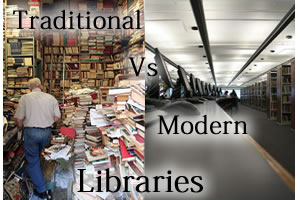
traditional vs modern library

The digital divide or information literacy

What is digital divide?

The term digital divide relates to the gap between those people who are able to make effective use of I.C.T. and those who are not. It can be defined as the gap between people who use computers and the internet and those who do not. It referred to the use of computers and (recently) the broadband.

What are the main effects of digital divide on society?


  • Trying to keep up with the leading countries is very expensive to developing countries. Networks are expensive, and therefore the country is placed at an economic disadvantage.
  • Schools and students who don't have I.C.T. technologies can't compete with others that can, which can effect teaching levels and literacy.
  • Older generations face great difficulties connecting with the younger ones, therefore creating an age group gap.
  • A person who doesn't have all the newest gadgets becomes an outcast in society.

Explain a real case study on bridging the digital divide gap


Close the Gap is an international non-profit organisation that aims to bridge the digital divide by offering high-quality, pre-owned computers donated by large and medium-sized corporations or public organisations to educational, medical, entrepreneurial and social projects in developing and emerging countries.


Sunday, 23 February 2014

Online services and health and safety

Continuously working with computers for long periods of times rises health problems/issues such as:

Increase in repetitive strain injury (R.S.I.)

the two most common R.S.I. aliments experienced by computer users are:
  • Carpal tunnel syndrome, a condition known to cause pain in the forearm and wrist.
  • Cubital tunnel syndrome, a similar condition known to affect the elbows (also known as cell phone elbows).
to reduce the chances of increasing repetitive strain injuries, the following advice should be followed:
  • Keep your wrists and hands in line with your forearm.
  • Keep your elbows in, and your forearms horizontal, at right angles to your upper arms.

Vision and posture problems

prolonged sittings in front of computers and bad lighting could cause:
  • Upper back ,neck and lower back problems. These include typical symptoms such as neck pain, shoulder pain, weakness of the arm and hand muscles and headaches.
  • Visual problems. It includes symptoms such as eye irritation and eye strain.
To prevent these problems, individuals must follow these health and safety guidance:
  • They must have a good-quality seating that supports the back.
  • Seating should be height adjustable
  • Monitors and keyboards should be correctly positioned
  • Operators should not have to look up or down at the monitors for prolonged periods

Continuously working with computers for long periods of times also rises safety issues such as:


  • Electrocution, which can be caused by overloaded electric sockets or electrical equipment located near water supplies. It can be avoided by hiring a qualified electrician do the electrical installations and locating electrical equipment away from water.
  • Fire, which happens when computers overheat or wires fray. can be avoided by always having a CO2 extinguisher and exits kept clear for if a big fire occurs.
  • Tripping hazards, caused by tripping over cables and computer wires. this can be avoided by not letting cables trail on the floor and storing equipment where it will not result in trailing cables.
  • Danger caused by heavy equipment falling, which happens due to falling of computer equipment or by a workstation collapsing. this can be avoided by using sturdy furniture and not letting the equipment overhang the workstation.

Saturday, 22 February 2014

Data Security and legal issues


  • What is the data protection act?

The Data Protection Act (D.P.A.) gives individuals the right to know what information is held about them, and provides a framework to ensure that personal information is handled properly.

  • Who is the Information Commissioner?

He is the person who has overall responsibility to enforce the data protection act in his respected country.

  • Who is the data controller?

He is responsible for ensuring that any collection, storage and processing of data is done in accordance with the data protection act.

  • Who are the data subjects?

These are the people that the data is being collected from or stored about.

  • Who are the data users?

He is someone who accesses, uses and processes personal data as a part of their job.

  • What is personal data?

It is information which coverts both facts and opinions about a living individual.

Computer misuse act

The Computer Misuse Act 1990 was designed to protect the integrity of computer systems by deterring the activities of hackers. it created three new offences, which makes sure personal information is:

  1. fairly and lawfully processed;
  2. processed for limited purposes;
  3. adequate, relevant and not excessive;
  4. accurate and up to date;
  5. not kept for longer than is necessary;
  6. processed in line with the rights of individuals;
  7. secure;
  8. not transferred to other countries without adequate protection.

Online services and Security and privacy of data

To reduce the chances of information theft from users certain data security aspects will be identified in the below categories:


  • Need to protect confidentiality of data:

Encryption is the main I.C.T. technique used to ensure the confidentiality of data in online systems.

  • Shop security:

Public-key systems are used to encrypt information that is transmitted using the Internet for payment purposes.

  • Online banking: There are three methods:

  1. Transaction numbers (T.A.N.s), or in other words passwords used only once.
  2. Asking the user to type only parts of their passwords.
  3. Providing customers with a handheld chip and P.I.N. device which is capable of generating single-use passwords (in other words "two-factor authentication"/ "2.F.A.").

  • Online shopping:

the customer should make sure that the data is being transmitted using either the secure socket layer (S.S.L.) or transport layer security (T.L.S.) protocols which are used in the encryption of messages between a client computer and a server.

Saturday, 15 February 2014

Online Shopping

What is online shopping?

Online shopping or e-shopping is a form of electronic commerce which allows consumers to directly buy goods or services from a seller over the Internet using a web browser. Alternative names are: e-web-store, e-shop, e-store, Internet shop, web-shop, web-store, online store, online storefront and virtual store. Mobile commerce (or m-commerce) describes purchasing from an online retailer's mobile optimized online site or app.

What are the pros and cons of online shopping?

Pros for Customers:

  • Convenient – You can buy clothes or anything you want with just one click, while you lay on the sofa.
  •  No need to fall in line. Just enter your credit card info and transaction is completed in an instant.

Pros for Business:

  • Reduced long-term costs – businesses do not need to pay for expensive shop premises, running costs (bills, insurance) and sales staff. They may need to employ people to set up and look after the website, but this will normally be cheaper.
  • Wider customer base - Products can be sold to customers all over the country/world and not just in the area where the shop is based.

Cons for Customers:

  • Risky –Make sure the website or online store you plan to shop at is legitimate. Check for reviews and testimonials, if available.
  • No Guarantees – There are chances of your mail not getting delivered on time, or not at all, due to a number of reasons (e.g. wrong address, problem with shipping, etc.). This is the reason why some online shops offer insurance to their clients.

Cons for Business:

  • Cost – businesses will normally need to pay out a lot of money to have their websites professionally designed and developed.
  • Staff with expertise – the staff required to run the online business will need to have the expertise to manage the website and keep it maintained.

What is the process of online shopping?

  1. Deciding which online shop to use
  2. Browsing product categories
  3. Using the virtual shopping basket
  4. Going to the checkout
  5. Waiting to receive the goods

What are the security issues of online shopping?

  • Hackers can defraud both the shop and the customer
  • To protect personal data and payment details they are encrypted when transferred over the internet.
  • That data can only be decoded if the receiving network server has the correct encryption key.
  • Nowadays the most common methods fraudsters use to obtain customer data is phishing, pharming and attaching spyware.
  • That is why customers are advised to read the terms and services to learn the ways of protecting their personal information.

Online Services

What is an online service?

An online service refers to any information and services provided over the Internet. These services not only allow subscribers to communicate with each other, but they also provide unlimited access to information. Online services can range from simple to complex. A basic online service may help subscribers gain needed data through a search engine, while a complex one might be an online mortgage application from a bank. Online services may be free or paid.

How does it affect the society?


  • Less money is spent on fuel for cars and the merchandise in general.
  • Less time consumed unnecessarily on going to the store to get the merchandise.
  • Less toxic gas is released into the air, therefor less pollution.
  • increase in back injuries due to wrong sitting positions in front of the computers.